> ## Documentation Index
> Fetch the complete documentation index at: https://kb.hosting.com/llms.txt
> Use this file to discover all available pages before exploring further.
# Configuring an e-mail alias in Plesk
> Watch our demo to learn how to create a Plesk e-mail alias and keep your address private while receiving all domain messages.
This article describes how to configure e-mail aliases in Plesk.
Plesk is no longer included with new hosting.com plans, but it is still available on legacy Managed WordPress accounts. You can install Plesk manually on unmanaged VPS and Dedicated servers.
E-mail aliases enable you to keep your e-mail address private. For example, if your main e-mail address is[kelly@example.com](mailto:is_kelly@example.com_), you probably do not want to publish it on the internet and receive spam. Instead, you can create an alias (for example, [comments@example.com](mailto:_comments@example.com_) ) and publish that address instead. When messages arrive for [comments@example.com](mailto:for_comments@example.com_), you receive them in your [kelly@example.com](mailto:your_kelly@example.com_) inbox.
## Configuring an e-mail alias
To watch a video that demonstrates the following procedure, please click below:
To configure an e-mail alias, follow these steps:
1. Log in to Plesk.
> 📘 Note
>
> If you do not know how to log in to your Plesk account, please see [this article](/docs/logging-in-and-out-of-plesk).
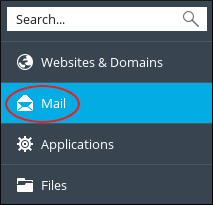
2. In the left sidebar, click **Mail**:\
3. On the **Mail** page, click the e-mail address for which you want to create an alias.
4. Click the **Email Aliases** tab.
5. In the **Email alias** text box, type the alias for the e-mail address.
You can specify multiple aliases. To do this, click **Add email alias** , and then type the additional alias or aliases.
6. Click **OK**. Plesk activates the alias (or aliases) for the e-mail account.
## More information
For more information about Plesk, please visit [https://www.plesk.com](https://www.plesk.com).
## Related articles
* [Enabling auto-reply messages for an e-mail account in Plesk](/docs/enabling-auto-reply-messages-for-an-e-mail-account-in-plesk)
* [Configuring an e-mail forwarder in Plesk](/docs/configuring-an-e-mail-forwarder-in-plesk)