> ## Documentation Index
> Fetch the complete documentation index at: https://kb.hosting.com/llms.txt
> Use this file to discover all available pages before exploring further.
# Determining if APC is installed on a server
> Learn how to determine if the Alternative PHP Cache (APC) is installed on your server. Give your site a boost with APC Hosting!
This article describes how to determine if the Alternative PHP Cache (APC) is currently installed on your server.
APC is supported on the following hosting packages:
* Turbo Velocity and Turbo Nitro Web Hosting
* VPS (managed and unmanaged)
* Dedicated server (managed and unmanaged)
## About APC
The Alternative PHP Cache (APC) is a PHP extension that provides *opcode caching*. By caching the compiled operation codes (opcodes) of PHP scripts, APC enables sites to serve page content significantly faster. APC runs on PHP 5.4 and earlier versions.
Because APC is a separate extension, it may or may not already be installed on your server. The following procedure explains how to determine if your server has the APC extension installed.
For PHP 5.5 and later versions, **OPcache** replaces APC. OPcache is a core PHP component that does not require the installation of a separate extension.
## Determining if APC is installed
To determine if the APC extension is installed on your server, follow these steps:
1. Create a file that contains the following PHP code:
```
```
2. Save the file as *info.php*.
3. Upload the file to the *public\_html* directory on your hosting account.
4. Use your browser to go to *[http://example.com/info.php](http://example.com/info.php)*, where ***example.com*** represents your website's domain name. The page displays a large amount of information about the server's PHP installation.
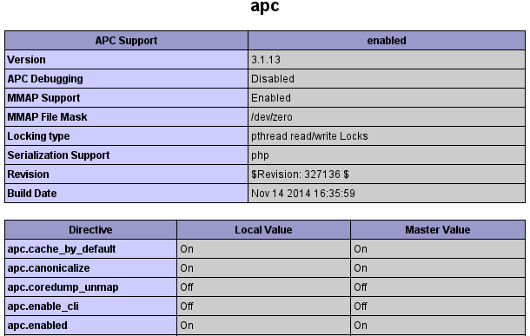
5. Use your browser to search for the term **apc**. If APC is installed, you see a section that resembles the following:\
**️ Warning**
For security reasons, you should remove the *info.php* file after you are done testing.
## More information
For more information about OPcache, please visit [https://php.net/manual/en/book.opcache.php](https://php.net/manual/en/book.opcache.php).
## Related articles
* [Viewing PHP settings](/docs/view-php-settings)