> ## Documentation Index
> Fetch the complete documentation index at: https://kb.hosting.com/llms.txt
> Use this file to discover all available pages before exploring further.
# How to configure DNS at GoDaddy for hosting.com Managed WordPress
> Learn how to configure DNS settings at GoDaddy for hosting.com Managed Hosting for WordPress.
This article describes how to update your domain's DNS settings at GoDaddy to point to a hosting.com Managed Hosting for WordPress site.
**Important**
Before you modify your domain's DNS settings, make sure you follow our [hosting.com Managed WordPress Quick Start Guide](/docs/hostingcom-managed-wordpress-quick-start-guide) to learn how to use the **Go Live!** feature in the hosting.com Dashboard.
To update DNS settings at GoDaddy, follow these steps:
1. Locate your site URL on the hosting.com Dashboard:
1. Log in to the Hosting Panel at [https://my.hosting.com](https://my.hosting.com).
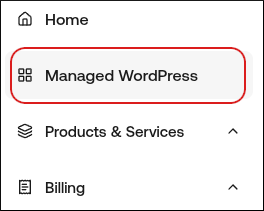
2. In the left sidebar, click **Managed WordPress**:
3. On the **My Websites** page, locate the site, and then click **Manage**:
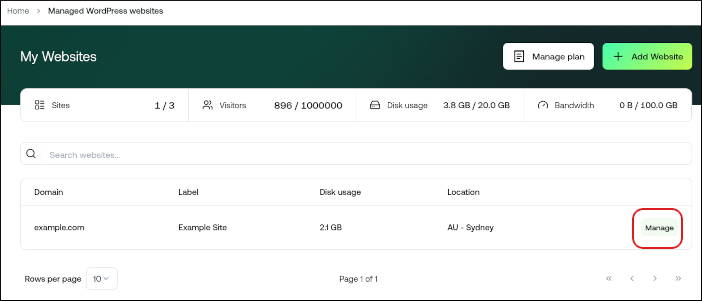
4. The site URL appears at the top of the page (for example, *abc123.wpdns.site)*.
2. Log in to your GoDaddy account.
3. Navigate to the DNS management for the domain you want to point to hosting.com.
4. Locate the A record for your apex domain.
> 📘 Note
>
> This is either **@** or your domain (for example, *example.com*).
5. To edit the record, click the pencil icon to the far right.
6. Locate the field **Points to**, and then add the IP address **104.19.154.92**.
7. Click **Save**.
8. Locate the **www** record:
* If the **www** record exists, edit it to point to your site URL (for example, *abc123.wpdns.site*).
* If the **www** does not exist, create the record:
Type: CNAME
Name: www
Host: Your site URL (**abc123.wpdns.site**)
9. That’s it! Your domain is now pointing to hosting.com.
> 📘 Note
>
> It may take up to 24 hours for DNS to fully propagate around the world. However, typically these changes take place in just a few minutes.