> ## Documentation Index
> Fetch the complete documentation index at: https://kb.hosting.com/llms.txt
> Use this file to discover all available pages before exploring further.
# Using GTMetrix to improve Drupal performance
> Learn how you can use the information in GTMetrix performance reports to help improve Drupal site performance. Just follow our step-by-step instructions.
This article describes how you can use the information in GTMetrix performance reports to help improve Drupal site performance.
We strongly recommend you follow the Drupal optimization steps described in [this article](/docs/optimizing-drupal) if you have not already done so.
👍 Tip
If you configure the settings as described below and your site's performance is still not at the level you want, there are additional options:
* Turbo Hosting use a drop-in Apache replacement that can load pages significantly faster than regular web hosting accounts.
* Managed VPS, Managed Dedicated Server, and Turbo Hosting accounts can use [Memcached](/docs/do-you-support-memcached-hosting)to decrease page load times.
* Managed VPS and Managed Dedicated Server accounts can use [Redis](/docs/do-you-support-redis)to decrease page load times.
## About GTMetrix
GTMetrix is an online tool that analyzes site performance and speed. All you have to do is provide a URL for GTMetrix to analyze, and it generates a detailed performance report. The report contains statistics and specific recommendations you can follow to help improve your site's performance.
If you are new to the concept of performance testing, we recommend you [sign up for a free GTMetrix account](https://gtmetrix.com/) and [take the tour](https://gtmetrix.com/dashboard/tours/activate). Review the [other supporting materials](https://gtmetrix.com/resources.html) to fully understand the concepts before proceeding.
## Running a GTMetrix performance report
To run a GTMetrix performance report for your site, follow these steps:
1. Use your web browser to go to *[http://gtmetrix.com](http://gtmetrix.com)*.
2. In the **Analyze Performance of** text box, type the URL for your web site:\

3. Click **GO!**. GTMetrix analyzes your site.
> 📘 Note
>
> The length of time to complete the analysis depends on how busy the GTMetrix site is at the moment, as well as your own site's speed. The entire analysis process can take several seconds up to a minute.
4. After GTMetrix completes the analysis, it displays a performance report for your site.
* The **Summary** section provides an overall grade and some basic site statistics:\

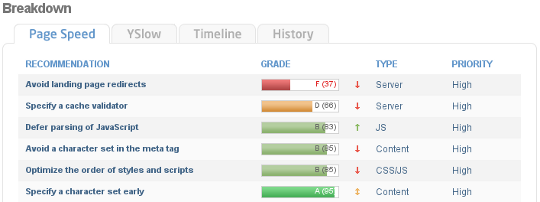
* The **Breakdown** section provides specific recommendations about how to improve performance, with the areas needing the most attention listed first:\
## Analyzing GTMetrix results
GTMetrix performance reports provide a lot of information. In the **Breakdown** section, the **Page Speed** and **YSlow** tabs display specific recommendations that can make a direct impact on your site's speed and performance.
GTMetrix provides a performance grade and a description for each recommendation. Some recommendations are more important than others, and have a larger impact on site speed. Recommendations that have the most effect on performance include:
* **Enable gzip compression** (Page Speed) and **Compress components with gzip** (YSlow): Enabling gzip compression reduces the size of each file the site serves. For information about how to enable compression for a Drupal site, please see [this article](/docs/optimizing-drupal).
* **Defer parsing of JavaScript** (Page Speed) and **Put JavaScript at bottom** (YSlow): Placing as much JavaScript code as possible at the bottom of a page ensures that the visitor sees the page *while* the browser downloads the JavaScript. Otherwise, the browser must download the JavaScript *before* it renders the page and displays it to the visitor.
* **Serve resources from a consistent URL** (Page Speed) and **Reduce DNS lookups** (YSlow): The fewer domains that your site uses to serve content, the fewer times a web browser must look up where a domain is hosted. For example, as described [here](https://developers.google.com/speed/public-dns/docs/performance), at an average of 130 milliseconds per DNS lookup, four separate domains serving your content could add half of a second (or more) to the overall load time.
* **Make fewer HTTP requests** (YSlow): Combining CSS and JavaScript files into single CSS or JavaScript files reduces the amount of HTTP connections and help decrease page load times. For information about how to configure this for a Drupal site, please see [this article](/docs/optimizing-drupal).
## Related articles
* [Optimizing Drupal](/docs/optimizing-drupal)
* [Using GTMetrix to improve Joomla performance](/docs/using-gtmetrix-to-improve-joomla-performance)
* [Using GTMetrix to improve Magento performance](/docs/using-gtmetrix-to-improve-magento-performance)
* [Using GTMetrix to improve PrestaShop performance](/docs/using-gtmetrix-to-improve-prestashop-performance)
* [Optimizing WordPress with W3 Total Cache and GTmetrix](/docs/using-w3-total-cache-and-gtmetrix-to-optimize-wordpress)