> ## Documentation Index
> Fetch the complete documentation index at: https://kb.hosting.com/llms.txt
> Use this file to discover all available pages before exploring further.
# Using Jetpack on cPanel-based Managed WordPress
> Learn how to use Jetpack on a managed WordPress account to manage backups, improve site security, and more.
This article discusses the [Jetpack](https://jetpack.com/) plugin on cPanel-based Managed WordPress. Installed on millions of WordPress sites, Jetpack is a popular plugin created and maintained by [Automattic](https://automattic.com/), the same company behind [WordPress.com](https://wordpress.com/).
Jetpack is a multi-purpose plugin that offers backups, security and performance enhancements, and more.
**Important**
The information in this article applies to older cPanel-based Managed WordPress hosting accounts. For information about **Managed WordPress powered by Rocket.net** hosting plans, go to [Managed hosting for WordPress powered by Rocket.net](/docs/managed-hosting-for-wordpress-powered-by-rocketnet).
## Activating Jetpack
Jetpack is installed automatically on all new accounts and ready for activation. To do this, follow these steps:
1. Log in to your WordPress site.
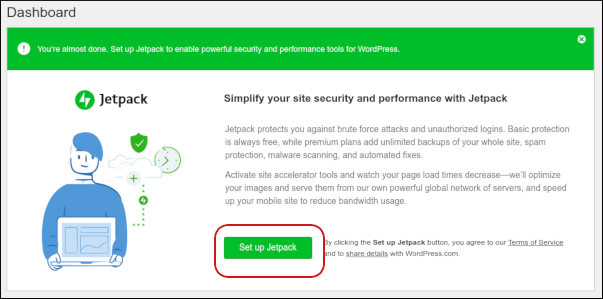
2. On the dashboard appears the Jetpack section. Click **Set up Jetpack**:\
3. The *WordPress.com* login page appears:\
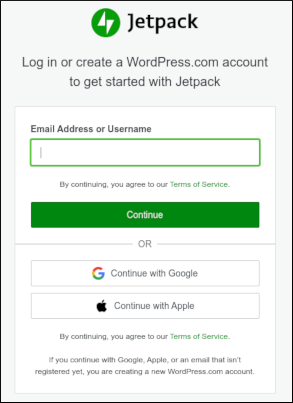
4. Type the e-mail address associated with your *WordPress.com* account, and then click **Continue**.
Alternatively, if you do not have a *WordPress.com* account yet, type your e-mail address, click **Continue** , and a *WordPress.com* account is created for you automatically. Check the inbox for the e-mail address you specified, and in the message from *WordPress.com*, click **Finish your Jetpack setup** .
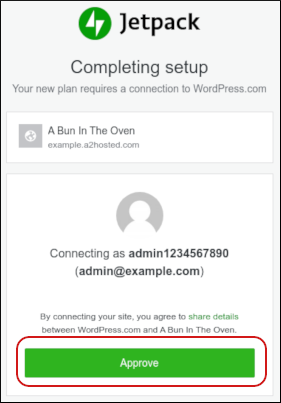
5. The **Completing setup** page appears. Click **Approve** to link your WordPress site to your *WordPress.com* account:\
6. After *WordPress.com* finishes connecting to your site, your WordPress site reappears with Jetpack activated.
**Important**
Please wait one hour for setup to complete fully. After one hour has elapsed, you can configure all of the Jetpack settings and options for your hosting plan.
## Using Jetpack
* For detailed information about how to use Jetpack's features, please see the official Jetpack documentation at [https://jetpack.com/support](https://jetpack.com/support).
* For specific information about how to configure Jetpack backups on your hosting.com account, please see [this article](/docs/configuring-jetpack-backups-on-managed-wordpress).
## Jetpack features
Jetpack is a multi-purpose plugin that can manage backups, help secure your site, and more. The list of available features depends on the Managed WordPress hosting plan that you have:
### Run plan
This plan includes a free Jetpack license with the following features:
* **Site speed score and 1-click optimizations** : Site speed affects SEO rankings and visitor experience. Jetpack boosts your site's performance and web vitals scores for better keyword rankings with simple 1-click performance optimizations.
* **Lazy loading images** : This feature improves site performance by automatically delaying the loading of media on posts and pages until visitors scroll down to where the media actually appears on the page.
* **CSS structure optimization** : This feature optimizes page styles to boost site speed, particularly for mobile visitors.
* **Deferred loading of non-essential JavaScript** : This feature delays loading non-critical processes, allowing the most important portions of your site to load first.
* **Brute-force protection** : This feature helps keep your site safe by blocking unwanted login attempts from malicious botnets and distributed attacks.
* **Automated spam filtering** : This feature protects your site from being bombarded with spam content.
* **Website statistics** : Jetpack provides clear and concise statistics about your visitors and traffic, so you can make actionable decisions to improve your site.
* **Activity log** : Jetpack logs site activity, including login attempts, published and updated posts, comment submissions, plugin installations, and more.
* **SEO tools** : Jetpack enables you to easily customize your site's meta titles and descriptions to help maximize search engine traffic.
* **Social media posting** : With Jetpack, you can share your content and publish social media posts directly within WordPress.
### Jump plan
This plan includes all of the features in the Run package, as well as a **Backup Daily** license. Backup Daily provides automated, daily backups to a secure offsite location.
For information about how to configure backups in Jetpack, please visit [https://jetpack.com/support/backup/backups-via-the-jetpack-plugin](https://jetpack.com/support/backup/backups-via-the-jetpack-plugin).
### Fly and Sell plans
These two plans include all of the features in the Run and Jump plans, as well as a **Security Daily** license. Security Daily helps improve site security with features such as comment form protection, [automated daily malware scanning](https://jetpack.com/2018/05/07/prevent-malware-with-jetpack/) and [Site Accelerator](https://jetpack.com/support/site-accelerator/).
## More information
For more information about Jetpack, please visit [https://jetpack.com](https://jetpack.com/) and [https://wordpress.org/plugins/jetpack](https://wordpress.org/plugins/jetpack).