.jpg?fit=max&auto=format&n=E2LlsT5gBITvo732&q=85&s=ec11e1673894bdf46663a5d73602eb87)
- Log in to the Hosting Panel at https://my.hosting.com.
-
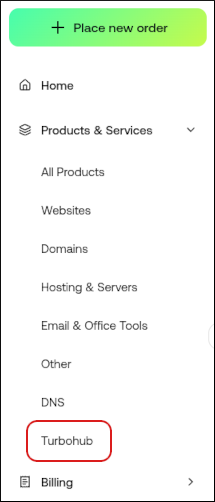
In the left sidebar, under Products & Services, click Turbohub:
-
The TurboHub dashboard appears with all of your WordPress sites:
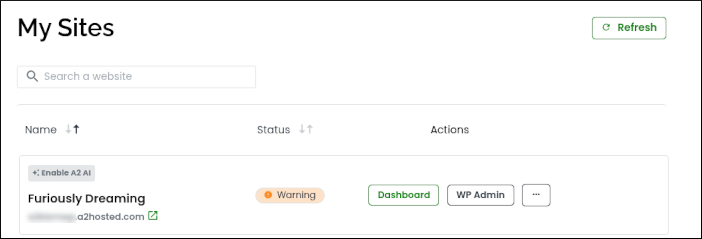
- Click Dashboard, and then click Enable A2 AI.
-
Click WP Admin to access your WordPress administration interface and the following AI features:
- AI-enhanced site creation and onboarding.
- An AI-powered chat assistant trained on WordPress help documentation.
- AI-powered domain name suggestions to help create the perfect name for your site.
-
An AI Design Library. The Design Library editor includes:
- AI-powered images: By providing text descriptions, you can generate high-quality images to use in your site.
- AI writing assistant: Create text to use in your site.
TurboHub
TurboHub onboarding for WordPress with AI enhancements
TurboHub simplifies WordPress site creation with AI enhancements for effortless customization.
TurboHub’s onboarding process makes it easy to create new, full-featured WordPress sites. Now we are taking it a step further by adding several AI (artificial intelligence) enhancements to help you create and customize your ideal site even more.
To enable these AI enhancements, follow these steps:
Was this page helpful?