.jpg?fit=max&auto=format&n=E2LlsT5gBITvo732&q=85&s=ec11e1673894bdf46663a5d73602eb87)
Changing the PHP version
Our servers support multiple versions of PHP. To change the PHP version used for your account, follow these steps:-
Log in to cPanel.
📘 Note If you do not know how to log in to your cPanel account, please see this article.
-
On the Tools page, in the Software section, click Select PHP Version:

🚧 Important If you do not see the Select PHP Version icon, your server does not support this feature.
- cPanel displays the current PHP version. To change the PHP version, in the Current PHP Version list box, select the version that you want to use, and then click Apply. The new PHP version takes effect immediately.
Changing PHP settings and extensions
In addition to changing the PHP version from cPanel, you can change various PHP settings. You can enable and disable PHP extensions, as well as configuration directives such as allow_url_fopen,error_log, and many more.This feature removes the need to configure and maintain custom php.ini files. Instead, you control all PHP settings directly from cPanel.
-
Log in to cPanel.
📘 Note If you do not know how to log in to your cPanel account, please see this article.
-
On the Tools page, in the Software section, click Select PHP Version:
🚧 Important If you do not see the Select PHP Version icon, your server does not support this feature.
-
On the Extensions tab, select which extensions you want to enable for the current PHP version:
- To enable an extension, select the check box next to the extension name.
-
To disable an extension, clear the check box next to the extension name.
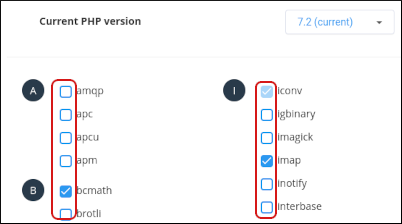
- cPanel automatically saves your selections, and they take effect immediately.
👍 Tip To reset the extension list to the default configuration, click Reset to default in the top right corner.
-
To change settings for the current PHP version:
- Near the top of the page, click the Options tab.
- Click the value next to the setting that you want to modify.
-
Depending on the type of setting, a list box may appear with predefined settings that you can choose. Or, a text box may appear so you can type the value:
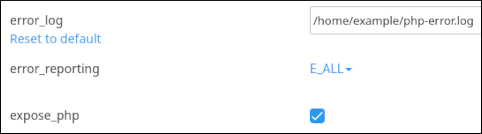
- cPanel automatically saves your selections, and they take effect immediately.
👍 Tip When you modify a setting, a Reset to default link appears beneath the setting label. Click the link to change the setting back to the default value.