.jpg?fit=max&auto=format&n=E2LlsT5gBITvo732&q=85&s=ec11e1673894bdf46663a5d73602eb87)

Using Pingdom
To measure your site’s performance using Pingdom, follow these steps:- Use your web browser to go to http://tools.pingdom.com.
- In the text box, type the URL that you want to test.
- Click Settings:
- If you do not want the test results to be viewable by the public, clear the Save test and make it public check box.
- If you want to test the site from a particular location, select the geographic region that you want.
- Click Test Now. Pingdom analyzes how long it takes to download the page and each element on the page, and then provides a “waterfall” chart of the entire page load process. Each downloaded resource is represented by a color bar on a timeline.
Interpreting the results
For each item listed in the waterfall chart under File/path, you can hover your mouse pointer over the corresponding color graph. Pingdom shows each download step and the amount of time it took:\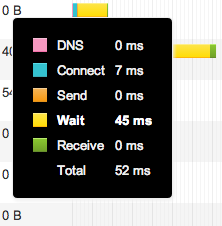 As you can see, each step of the page load process is color coded:\
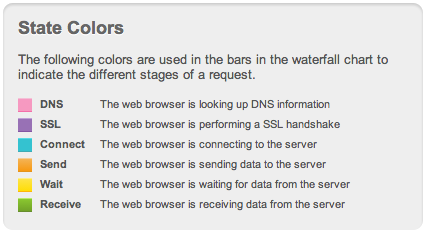 Let’s look closer at each of these steps in the page load process:
DNS: This is the amount of time it takes for the browser to identify where the site is hosted. Make sure your site uses a reliable DNS server. For information about setting the name servers for a domain, please see this article.
SSL: If the URL specifies SSL (that is, if the URL begins with https:// ), this means the browser is exchanging encryption keys with the web server.
Connect: This is the amount of time it takes for the browser to open a connection to the server on port 80 (HTTP) or 443 (HTTPS) before the browser actually sends the request. The server then sends a response when it is ready to accept a request. Using persistent HTTP connections (that is, the Connection: Keep-Alive header) reduces the time for subsequent client requests to the server.
Send: This is the amount of time it takes for the browser to send the request, including the URL,Cache-Control headers, cookies for the domain, and any other headers that the browser wants to send (such as User-Agent ).
Wait: This is the most important step, and one that you can control as a webmaster. The wait time is the amount of time for the server to process a request, generate content, and start to send a response. This includes processing .htaccess rules, running PHP code, and accessing databases.
Receive: This is the amount of time it takes to download the requested page after the server starts sending the response.
Total: This is the total amount of time to do all of the above steps.
Let’s look closer at each of these steps in the page load process:
DNS: This is the amount of time it takes for the browser to identify where the site is hosted. Make sure your site uses a reliable DNS server. For information about setting the name servers for a domain, please see this article.
SSL: If the URL specifies SSL (that is, if the URL begins with https:// ), this means the browser is exchanging encryption keys with the web server.
Connect: This is the amount of time it takes for the browser to open a connection to the server on port 80 (HTTP) or 443 (HTTPS) before the browser actually sends the request. The server then sends a response when it is ready to accept a request. Using persistent HTTP connections (that is, the Connection: Keep-Alive header) reduces the time for subsequent client requests to the server.
Send: This is the amount of time it takes for the browser to send the request, including the URL,Cache-Control headers, cookies for the domain, and any other headers that the browser wants to send (such as User-Agent ).
Wait: This is the most important step, and one that you can control as a webmaster. The wait time is the amount of time for the server to process a request, generate content, and start to send a response. This includes processing .htaccess rules, running PHP code, and accessing databases.
Receive: This is the amount of time it takes to download the requested page after the server starts sending the response.
Total: This is the total amount of time to do all of the above steps.