.jpg?fit=max&auto=format&n=E2LlsT5gBITvo732&q=85&s=ec11e1673894bdf46663a5d73602eb87)
About the WordPress heartbeat
The “heartbeat” feature enables WordPress to monitor user actions and send periodic updates to the web server. The heartbeat is used to save drafts automatically, lock post edits, log out administrators after an idle period, and more. However, in some scenarios the heartbeat may send an excessive amount of requests to the server. When this occurs, site performance can suffer. For example, CPU loads may increase, or you may receive “The Connection Has Been Reset” messages in your browser. By default, WordPress does not provide a way to disable or change the heartbeat settings. However, you can install a plugin to do this.Configuring the WordPress heartbeat using a plugin
The easiest way to configure the WordPress heartbeat is to use a plugin. The LiteSpeed Cache for WordPress plugin enables you to quickly and easily do this.If you have not already installed the LiteSpeed Cache for WordPress plugin on your WordPress site, please see this article for information about how to do so.
- Log in to your WordPress site as the administrator.
-
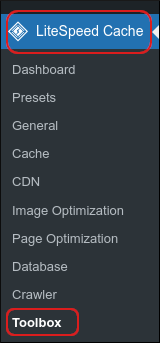
In the left-hand pane, click LiteSpeed Cache, and then click Toolbox:
-
On the LiteSpeed Cache Toolbox page, click the Heartbeat tab:

- A list of available settings appears. For detailed information about each of the options, please visit https://docs.litespeedtech.com/lscache/lscwp/toolbox/#heartbeat-tab.
- Click Save Changes. The new heartbeat settings take effect immediately.