.jpg?fit=max&auto=format&n=E2LlsT5gBITvo732&q=85&s=ec11e1673894bdf46663a5d73602eb87)

Installing Advanced Database Cleaner
To install the Advanced Database Cleaner plugin, follow these steps:- Log in to WordPress as the administrator.
-
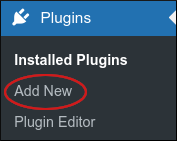
On the Dashboard in the left sidebar, click Plugins, and then click Add New:
-
On the Add Plugins page, in the Search plugins text box, type
Advanced Database Cleanerand then press Enter. -
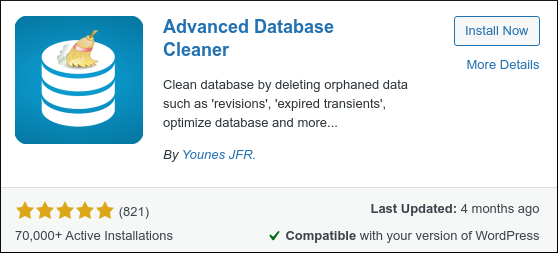
Locate the Advanced Database Cleaner section, and then click Install Now:
- When installation is complete, click Activate. You are now ready to configure Advanced Database Cleaner.
Running Advanced Database Cleaner
To run the Advanced Database Cleaner plugin, follow these steps:-
Before you do any cleaning, create a backup of your database in case you need to revert any changes.
📘 Note For information about how to back up a MySQL database, please see this article.
- Log in to WordPress as the administrator.
-
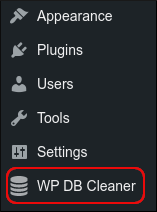
On the Dashboard in the left sidebar, click WP DB Cleaner:
- On the Advanced DB Cleaner page are several tabs:
-
General clean-up: On this tab you select the specific items that you want to clean.
❗️ Warning Be careful which items you clean! If you clean
Revisions or
Auto drafts , you may affect someone else’s work in progress. We strongly recommend you only run the cleaner when no one else is logged in to WordPress. - Tables: Click this tab to see the tables in the WordPress database. You can optimize and repair tables on this tab.
- Options: Click this tab to see WordPress settings in the options table.
- Cron jobs: Click this tab to see the cron jobs for the WordPress installation.
- Overview & settings: Click this tab to see an overview of your site’s database and unused data.
- To clean the database:
- On the General clean-up tab, in the Bulk actions list box, select Clean.
-
Select the check box next to the item you want to clean. For an initial cleanup we recommend the following items:
- Spam comments.
- Trashed comments.
- All orphaned data options.
- Click Apply.
- Click Continue to confirm. Advanced DB Cleaner cleans the specified items.
More information
For more information about Advanced Database Cleaner, please visit https://wordpress.org/plugins/advanced-database-cleaner.Related articles
- Monitor MySQL Database Performance in WordPress
- Installing and using the Query Monitor plugin
- Updating WordPress database configuration settings
- Optimizing and repairing MySQL databases with phpMyAdmin
- Importing and exporting a MySQL database
- MySQL database backups using AutoMySQLBackup
- MySQL database backups using cron jobs